Nulled-WP

WooCommerce Product Stats and Related Nulled Free Download

Updated Lately to Version: 3.2

Last Updated: 2021-09-11

WooCommerce Product Stats and Related Nulled Download Now

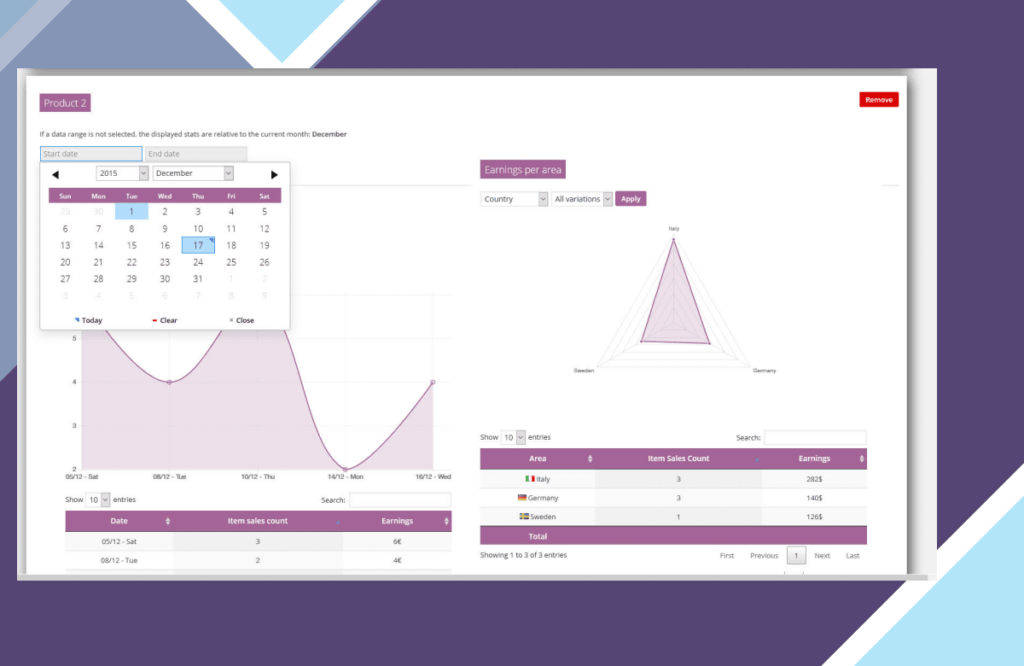
The WooCommerce Product Stats and Related! (WCPST) plugin gives to the shop admin a set of very intuitive and detailed products stats. All the stats you may need, at your fingertips.

HOW IT WORKS

It’s very easy, once installed and activated, you will find a new “Stas” menu voice under “Products” menu voice. Once there, you will be able add “Products cards” in which are reported product stats like:

Product earnings per period (daily, monthly, early)

Product earnings per country/province

Product earnings per customer

Product earnings per payment method

Best related product (the most purchased products with the selected product)

Shop admin can add multiple cards related to different product or the same product (with different time periods)

CONFIGURABLE TIME PERIODS

All stats are filtrabe by time period, in this way the shop admin can retrieve the stats for a single day or for the entire shop live time!

VARIABLE PRODUCTS COMPATIBILY

WCPST will also display products stats even for single variation!

STATS LINK ON PRODUCT LIST PAGE

WCPST will add a new “stats” column on product list page. In this way the shop admin can easily access the product stats page.

RELATED PRODUCTS LIST OVERRIDE

WooCommerce shows on product page, by default, a list of “related” products. However these products are just products that belog to the same category.
The WCPST overrides seamlessly the default behavior populating the list with “real” related products. This is done analizyng orders and finding which are the most purchased products together with the current one!
Further more, using the WooCommerce -> Stats – general options menu, is possible to disable this feature or set the time span used to compute the related products or, in case there aren’t any related products, show as related products the ones which belongs the the same category (normal behavior).

NOTE: This feature requires that a product belongs to a category with at least 2 elements otherwise the default function is not even called so it cannot be overridden.

You can found it at quite the top of the template. In this case the override will always be working.

PURCHASE PRICE FOR A MORE ACCURATE EARNING CALCULATION

For every product and variant (only for WC > 2.5) the shop admin can specify a “Purchase price”. Specifying this value, WCPST can calculate earnings in a more accurate way. Infact for every stat, the earning values will be computed as sale_price – purchase_price.


WooCommerce Product Stats and Related Free Download

Current Version: 3.2

What are nulled items and why WooCommerce Product Stats and Related Nulled is the right choice?

All “Nulled” means is that the item is preactivated and ready to be used upon installation (License notices, if present, can simply be ignored). License keys are only required for the original author support (which is of course not included).

All items advertized on our site are 100% safe, tested and verified by 3 different anti virus and anti malware programs.

Latest Items

Interno – Architecture And Interior WordPress Theme

Elevate your architecture or interior design firm with Interno, a modern and sleek WordPress theme designed to showcase your portfolio in a distinctive way. Perfect for architecture firms, interior design studios, construction companies, and more, Interno offers a clean and stylish appearance that will impress your clients.

Read More

Timeline Widget Pro For Elementor

Enhance your website with Timeline Widget Pro and create dynamic timelines that will captivate your audience. Customize layouts and animations to provide a visually engaging experience for your visitors. Stand out from the crowd and showcase your content in a unique and interactive way.

Read More

Directorist – Pricing Plans

Elevate your directory website with Directorist Pricing Plans. Create custom price packages, offer subscription options, and streamline payment management. Boost your directory site’s revenue potential today!

Read More

SearchWP Polylang Integration

Enhance user experience on your multilingual website with SearchWP Polylang Integration. Filter search results by language for a more precise and tailored experience. Ideal for sites using Polylang, this integration optimizes the search functionality for a seamless browsing experience.

Read More

SearchWP Give Integration

Easily integrate GiveWP forms and donation records on your website with SearchWP Give Integration, allowing your visitors to quickly find the information they need.

Read More

Envira Gallery – Beaver Builder

Create stunning photo galleries effortlessly with Envira Gallery – Beaver Builder Addon. This add-on seamlessly integrates with the Beaver Builder page builder, giving you the ability to easily customize and showcase your images. With adjustable layouts, mobile responsiveness, and fast loading times, your photography will look amazing on all devices. Elevate your website with beautiful galleries today!

Read More